
Exporting a training dataset
SplatPilot trains splats itself, but you can also train in another program: File > Export > Splat Training Dataset (COLMAP/nerfstudio) writes the rendered views, their cameras and a point cloud in the layout that program expects. It works without SplatPilot’s training engine.
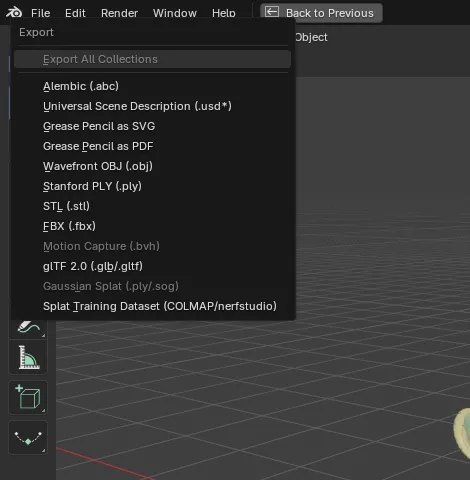
Export the views
Section titled “Export the views”-
Render the views: click Render (or Create Splat) in the Create Splat panel. The export takes the views rendered last, the ones Train uses. Without them the menu entry is greyed: “No rendered views”.
-
Choose File > Export > Splat Training Dataset (COLMAP/nerfstudio) and pick an empty folder.
-
Choose the Format and options in the file browser’s side panel, which also shows how many views there are and their size, such as “156 views · 800 × 600 px”. Then click Export Splat Training Dataset.
The report gives the images, cameras and points written and the folder.
A splat’s views
Section titled “A splat’s views”Export Training Dataset… in a splat’s menu in
Results exports the views that splat was trained
on and the views added to it, not the views rendered last, with the same formats and options. The
added views’ images are named with a prefix (add1_, add2_, …).
Formats
Section titled “Formats”| Format | Layout |
|---|---|
| Postshot | The images and the COLMAP model in one folder |
| GraphDECO 3DGS (default) | COLMAP layout: images/ and sparse/0 |
| OpenSplat | COLMAP layout: images/ and sparse/0 |
| LichtFeld Studio | COLMAP layout: images/ and sparse/0 |
| nerfstudio | transforms.json, images/ and a point cloud PLY |
The COLMAP models are binary, with pinhole cameras.
Options
Section titled “Options”| Option | Default | What it does |
|---|---|---|
| Include Test Views | Off | Also exports the test views, held out of training |
| Remove Alpha | Off | Composites the images onto a colour, for tools that ignore alpha |
| Background | Black | The colour behind the subject in the exported images; applies only with Remove Alpha |
| Points | 100,000 | Points in the point cloud that other trainers start from: on the scene’s faces where the views see them, and on the rendered surfaces |
The images keep their transparent background unless you tick Remove Alpha.