
Results
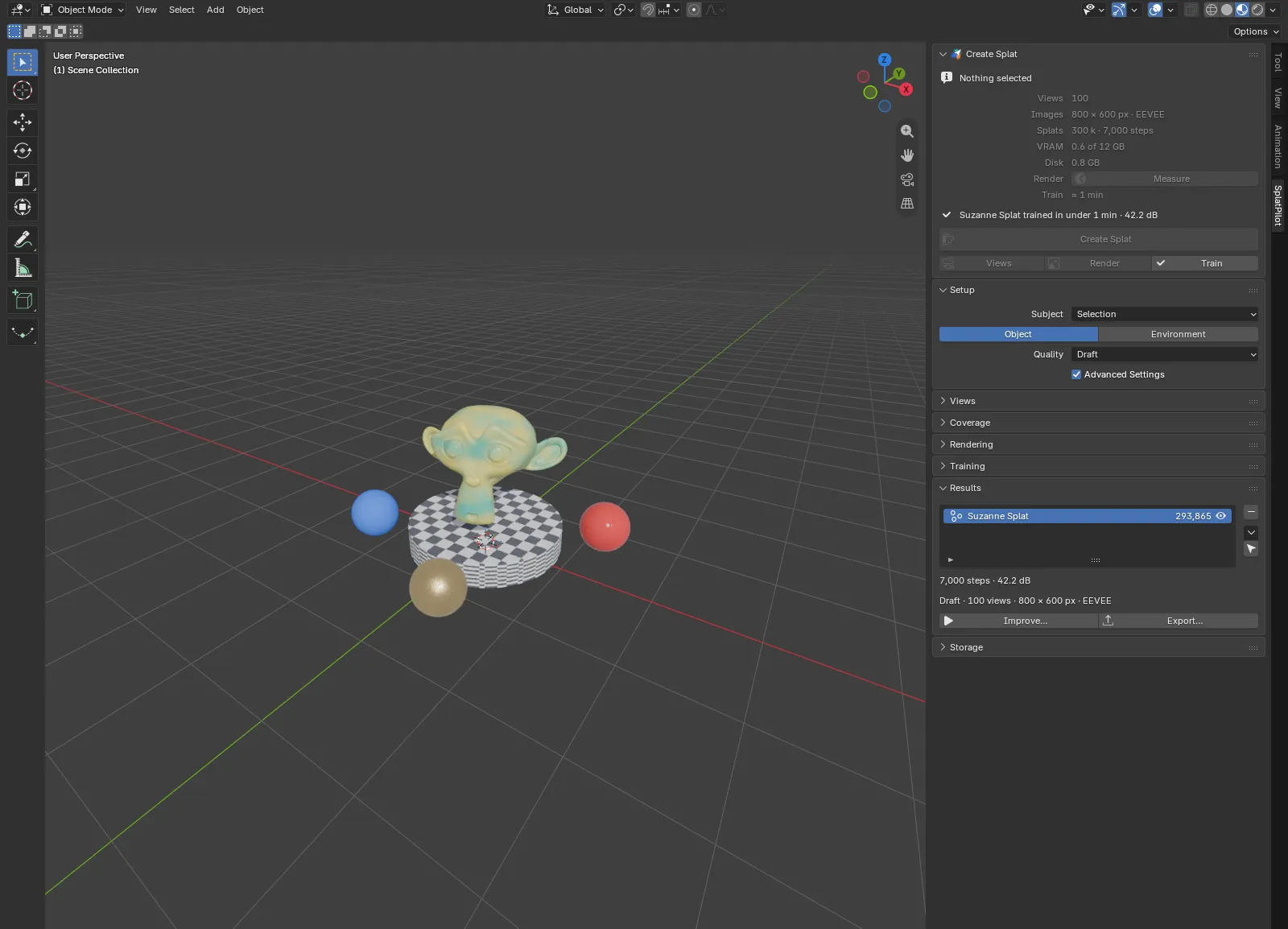
The Results panel, after Training in the SplatPilot tab, lists the Gaussian splats in the current scene and acts on the splat shown below the list.
The list
Section titled “The list”Each row holds a splat’s name, its exact splat count and an eye that hides the splat in the viewport, its sky dome with it, to compare with the scene underneath (the Outliner’s eye, so Alt H shows it again too). Double-click a name to rename the splat. Training previews and sky domes are not listed; a sky dome shows with its splat.
Clicking a row shows that splat below the list; the selection in the scene stays as it is. A new splat is shown when it arrives.
| Button | What it does |
|---|---|
| − | Delete Splat…, see Delete Splat. Greyed for splats from other tools: “Not trained by SplatPilot”. |
| ▾ | The splat’s menu, see The splat’s menu. |
| Select (the pointer icon) | Select Splat: selects the splat alone and makes it active. |
Without splats, the panel reads “No splats”.
The shown splat
Section titled “The shown splat”Below the list, for the shown splat:
| Line | For example |
|---|---|
| The training steps and the score | “7,000 steps · 42.2 dB” |
| The recipe: quality, views (test views and added views included), image size, and the engine the views were rendered with | “Draft · 100 views · 800 × 600 px · EEVEE” |
| The sky dome, with an eye that hides the dome alone; only with Sky Dome | “Sky dome · 40,000 splats” |
| Improve… and Export… |
The score is the PSNR on the test views, views the splat was not trained on. Higher is better; compare it between runs of the same views, not between scenes (an object on an empty background scores far higher than a detailed room). Without test views there is no score. Splats trained before SplatPilot recorded recipes have no recipe line.
Splats from other tools (imported from a file, for example) read “Not trained by SplatPilot”, with Export… only below.
Improve
Section titled “Improve”Splats SplatPilot trained Improve… trains the splat on from its checkpoint: with more views, more steps, or both. Its dialog, “Improve Suzanne Splat”, has three settings; Start runs it.
| Setting | Default | What it does |
|---|---|---|
| Add Views | On, with the quality’s view count | Renders this many more views and trains on them together with the splat’s views. Needs Views > Source: Automatic; otherwise greyed, with “Add Views needs Views > Source: Automatic”, and Improve trains more steps only. |
| More Steps | The quality’s steps | Training steps on top of the splat’s. |
| Keep the Current Splat | Off | Trains into a new splat and keeps this one to compare; the new one is named after it, such as Suzanne Splat.001. Off, the result replaces this splat’s data; its transform, modifiers and materials stay. |
Below them, the dialog gives the training time, such as “Training ≈ 6 min”, followed by “, after rendering the views” with Add Views.
In an environment, added views stand where the splat’s views are thin, at new positions; around an object, the view spheres are turned so that the new views fall between the old ones. They are planned for the subject the splat recorded, whatever is selected now.
The splat stays as it is until the new result arrives. Pause and Resume in the Create Splat panel work as for any run.
Greyed, the button’s tooltip says why:
- “A render or training is running”
- “This splat does not read back as the engine wrote it: update SplatPilot”
- “Its checkpoint was removed”: Train Again in the splat’s menu still makes a new splat from its views.
- “Its rendered views were removed”
Export
Section titled “Export”Any splat Export… opens the file browser and saves the splat as a file, as it sits in the scene: moved, rotated or scaled uniformly is fine, and the view-dependent colour turns with it. A splat scaled differently along its axes (or sheared) cannot be exported; keep its scale uniform.
The browser starts in the folder this scene exported to last (at first, the .blend file’s
folder), with the file named after the splat. Format in its side panel picks the format, and
the file’s extension follows it.
| Format | What it is |
|---|---|
| PLY (default) | Every value as trained. Most splat tools read it. |
| SOG | PlayCanvas’s compressed format for the web; SuperSplat and the PlayCanvas engine load it. About 15 times smaller (a million splats: 16 MB instead of 248 MB): positions, shapes and colours are quantised, and the view-dependent colour shares a palette of up to 16,384 entries. Splats too faint to show at 8-bit opacity are left out. A million splats take about half a minute; Blender waits meanwhile. |
The report gives the file and its size: “Exported Suzanne Splat to Suzanne_Splat.ply (248 MB)”. A SOG export also counts the splats left out: “(16 MB, 2,310 faint splats dropped)”.
File > Export > Gaussian Splat (.ply/.sog) exports the active object the same way, any splat object. It is greyed while the active object is not a splat: “No active splat object”.
The splat’s menu
Section titled “The splat’s menu”▾ beside the list opens the shown splat’s menu. For splats from other tools it holds Mark as Asset only.
Train Again
Section titled “Train Again”Splats SplatPilot trained Trains a new splat on this splat’s views (including views added to it) with the current
Training settings, for example another splat budget or more steps. This
splat stays, to compare; the new one is named after it, such as Suzanne Splat.001. Train Again
needs the splat’s rendered views, not its checkpoint.
Use Its Settings
Section titled “Use Its Settings”Splats SplatPilot trained Sets the scene’s quality settings to the ones the splat was trained with, as choosing a preset applies them. The scene’s render engine stays as it is. Greyed for splats trained before SplatPilot recorded its settings: “Trained before SplatPilot recorded its settings”.
Export Training Dataset
Section titled “Export Training Dataset”Splats SplatPilot trained Exports the views the splat was trained on, and the views added to it, as a training dataset for another tool, with the same options as File > Export > Splat Training Dataset. Greyed when its views were removed: “Its rendered views were removed”.
Mark as Asset
Section titled “Mark as Asset”Any splat Marks the splat as an asset tagged “splat”, with a preview image, so the Asset Browser lists it. A splat SplatPilot trained gets a description of its subject, quality, splat count and score, such as “Props · Draft · 293,761 splats · 42.2 dB”. The report reads “Marked Props Splat as an asset”. Once the splat is an asset, the entry is gone from the menu.
Open Run Folder
Section titled “Open Run Folder”Splats SplatPilot trained Opens the folder of the splat’s last training in the storage folder’s jobs/: its log and
checkpoint. Greyed once that folder is removed: “Its run folder was removed (Clean Up or Delete)”.
Delete Splat
Section titled “Delete Splat”Splats SplatPilot trained − beside the list removes the splat object, its sky dome, its trained file with its recipe, and its training’s checkpoint and logs. Tick Rendered Views to delete the views it was trained on as well, unless another splat in this file uses them. Blender asks first (“Delete Suzanne Splat?”, “Deletes its trained file and checkpoint”); the report gives the space freed.
Delete Splat is refused while something renders or trains in the scene, since a running job may use the same files: “A render or training is running: it may use these files”.
What a splat records
Section titled “What a splat records”Every splat SplatPilot trains keeps a record of what it was made with:
- The subject: the selection by object name (up to 200 objects) or the collection, and the kind. Improve’s Add Views plans for this subject. With a larger selection or Subject: Scene, it plans for the current subject.
- The recipe: the quality as the Quality button showed it and the settings of the click; the views as rendered (counts, image size, samples, engine); the training’s steps, splat budget and SH degree; the SplatPilot and Blender versions and the date; once trained, the steps reached, whether the training reached its planned steps, and the training time in seconds.
The trained file in the storage folder’s results/ is named after the splat and the time its
training started, such as Suzanne_Splat-20261009-021345.ply, with the recipe beside it as a
.json file of the same name. Results shows the recipe in one line;
Use Its Settings applies its settings again.
Recovering splats
Section titled “Recovering splats”Blender was closed or crashed while a splat trained. SplatPilot stops the training and keeps the splat as far as it got, with a checkpoint. When you open the file again, the last button of the Results panel imports all of them, such as Import 1 Stopped Training or Import 3 Stopped Trainings. Improve trains an imported splat on. This works for saved files.
A training failed (a GPU reset, out of memory). The engine saves a checkpoint every 5 minutes; if it saved one, the error line ends in “· checkpoint at step 12,000” and Resume in the Create Splat panel goes on from there. Open Log at the end of the error line opens the training’s error output.